A “UGR < 22 LED flat panel” is not automatically glare-compliant in every room.
Unified Glare Rating depends on the luminaire’s light distribution, but it also depends on the room dimensions, surface reflectance, mounting height, luminaire layout, observer position and viewing direction.
For B2B buyers, the correct question is not simply:
Is this panel UGR < 22?
It is: Under which calculation conditions is it below 22, and will the proposed lighting layout meet the project’s glare limit?
That distinction can prevent specification errors, rejected submittals and product returns.
What Does UGR < 22 Mean?
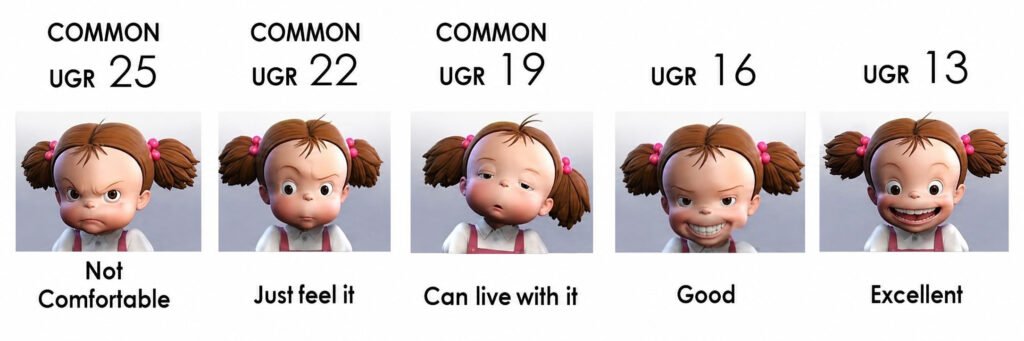
Unified Glare Rating, or UGR, is a method used to evaluate discomfort glare from indoor lighting installations.
CIE 117:1995 established the UGR formula. It considers:
- Background luminance
- Luminaire luminance toward the observer
- Apparent size of each glare source
- Position of each luminaire in the field of view
- Observer position and viewing direction
A lower calculated value generally indicates less predicted discomfort glare.
The commonly used UGR scale includes values such as:
- UGR 16
- UGR 19
- UGR 22
- UGR 25
- UGR 28
The limit is selected according to the visual task and application. Therefore, UGR 22 is not a universal requirement for every commercial space.
The Most Important Fact: UGR Is Not Just a Product Number
Manufacturers often describe a luminaire as “UGR < 22” or “UGR < 19.” This is convenient for product selection, but technically incomplete.
UGR evaluates a lighting installation—not only an individual LED panel.
The same flat panel can produce different UGR results when any of the following changes:
- Room length and width
- Ceiling height
- Mounting height above the observer
- Ceiling and wall reflectance
- Number of luminaires
- Spacing between luminaires
- Luminaire orientation
- Observer location
- Viewing direction
- Panel output setting
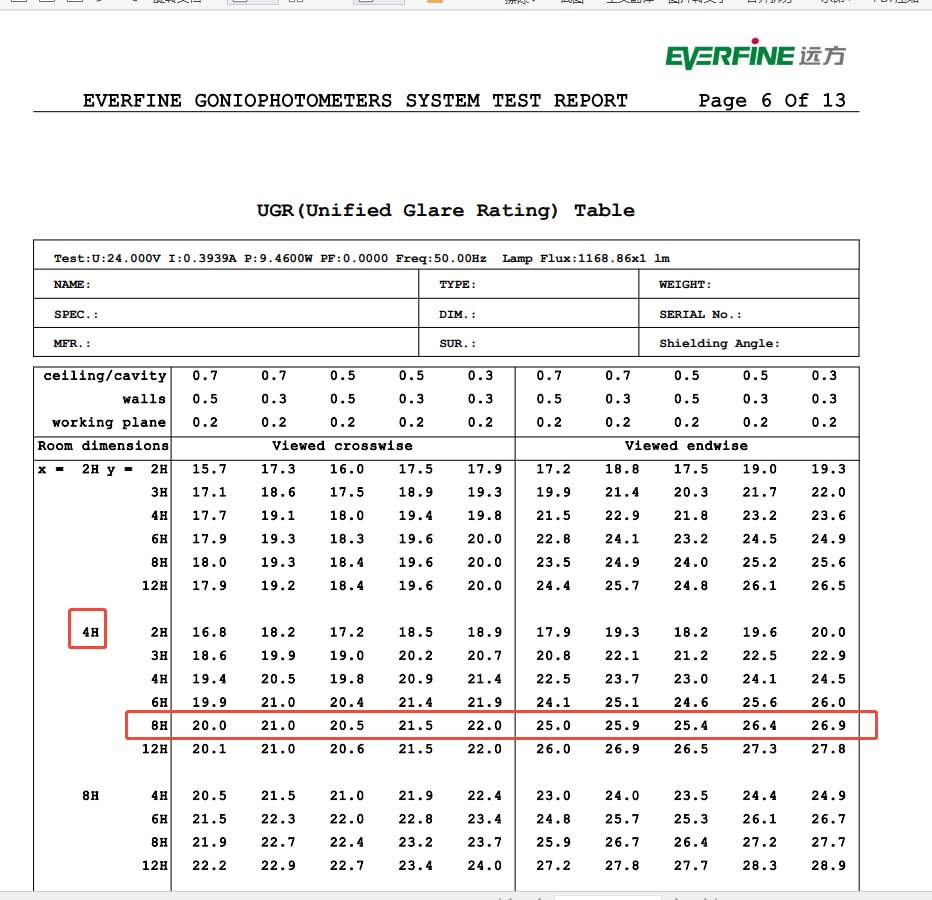
A product data sheet may show a tabular UGR value calculated under standardized room conditions. The final project value must still be checked using the actual lighting layout.
“UGR < 22” Is Usually a Calculation Claim, Not a Certificate
There is no universal certificate that makes an LED panel UGR < 22 in every installation.
A supplier may provide:
- An IES or LDT photometric file
- An LM-79 photometric report
- A CIE UGR table
- A lighting simulation
- A laboratory-issued calculation report
These documents are useful, but they serve different purposes.
The UGR table is normally calculated from the luminaire’s photometric data under specified reference conditions. CIE 190:2010 describes the calculation and presentation of UGR tables for indoor luminaires in preset room and luminaire arrangements.
The table does not guarantee the same result in a warehouse, classroom, office or retail project with different geometry.
For procurement purposes, “UGR report available” should not be treated as equivalent to independent product certification.
UGR < 22 vs UGR ≤ 22
Project specifications commonly define a limiting UGR value, meaning that the calculated glare rating should not exceed the specified limit.
This is usually written as:
UGR ≤ 22
A product page may instead use:
UGR < 22
The commercial difference may appear small, but buyers should still ask whether the supplier is quoting:
- A rounded result
- A maximum tabular value
- A value from one reference room
- A selected viewing direction
- A value from an actual project layout
- A marketing classification without the underlying calculation
The number alone is not enough. Its calculation conditions must be available.
Is UGR < 22 Suitable for Offices?
Not automatically.
UGR limits are application-specific. Office tasks involving prolonged reading, writing or display-screen work can have more demanding glare requirements than corridors, storage areas or general circulation spaces.
The current ISO/CIE 8995-1:2025 indoor workplace lighting standard addresses illuminance, discomfort glare, colour rendering and other quality criteria for different indoor tasks.
Many office specifications use a limiting value of UGR 19 for workstation areas. A panel marketed as UGR < 22 may therefore fail a project that explicitly requires UGR ≤ 19.
Before approving the product, verify:
- The exact activity performed in the room.
- The applicable local or project standard.
- The specified limiting UGR value.
- Whether the value applies to the whole room or defined task areas.
- The required illuminance and uniformity at the same time.
A lower-glare claim should never be reviewed separately from the actual application.
UGR 19 Is Not Automatically the Best Choice for Every Project
Another common assumption is that a UGR 19 panel must always be better than a UGR 22 panel.
That is not necessarily true.
A more aggressive optical system may reduce high-angle luminance, but depending on the design it can also affect:
- Light distribution
- Luminaire efficacy
- Illuminance uniformity
- Spacing requirements
- Required fixture quantity
- Product cost
- Visual appearance
A warehouse aisle, back room or circulation area may not need the same glare limit as a workstation or classroom. Specifying UGR 19 everywhere can increase project cost without delivering proportional value.
The correct product is the one that meets the required glare limit, illuminance, uniformity and energy target in the actual space.
How an LED Flat Panel Controls Glare
LED flat panels can use several optical approaches to reduce perceived glare.
Diffused Lens
An opal or frosted diffuser spreads light across a larger luminous area and hides individual LEDs.
It can improve visual uniformity, but a uniformly bright surface can still cause discomfort glare when the panel has high luminance or is positioned prominently in the observer’s field of view.
“Even surface illumination” does not automatically mean “low UGR.”
Microprismatic Lens
A microprismatic optical surface redirects light and can reduce luminance at critical viewing angles.
Its result depends on prism design, material quality, optical orientation and the panel’s complete light distribution.
Two panels that both use a “microprismatic diffuser” can have significantly different glare performance.
Louver or Cell Structure
Louvers restrict high-angle light and can provide stronger glare control.
However, they may create a narrower distribution, visible luminance contrast or lower output in some directions. Their effect must be evaluated together with fixture spacing and project illuminance.
Recessed Installation
Recessing the panel can reduce its visibility from some viewing positions, but installation alone does not guarantee a specific UGR result. Mounting height, ceiling layout and observer direction still matter.
A Diffuser Can Hide LEDs Without Solving Glare
This is an important product-selection distinction.
LED dot visibility and UGR are not the same problem.
A diffuser may eliminate visible LED dots while the panel surface remains very bright. Conversely, an optical panel with visible structural details may control high-angle luminance effectively.
B2B buyers should therefore avoid approving an anti-glare panel based only on:
- Product photographs
- A visual sample viewed on a table
- Diffuser thickness
- “No LED dots” claims
- Microprismatic material descriptions
Glare performance must be supported by photometric data and a relevant calculation.
Non-Uniform LED Surfaces Can Complicate UGR Evaluation
Traditional UGR calculations use the average luminance of the glare source. This works best when the emitting surface is reasonably uniform.
Some LED luminaires contain:
- Bright optical cells
- Visible LED hotspots
- Alternating bright and dark areas
- Highly directional microstructures
- Uneven diffuser luminance
CIE 232:2019 notes that conventional UGR calculations can underestimate discomfort from luminaires with strongly non-uniform source luminance.
For an LED flat panel, buyers should examine both the calculated UGR data and the appearance of the illuminated surface. A technically acceptable average value can still hide uncomfortable local brightness contrasts.
What B2B Buyers Should Request
A buyer evaluating a top LED flat panel manufacturer should request evidence connected to the exact quoted model.
1. Exact Photometric File
Request the IES or LDT file for the specific:
- Panel size
- Wattage
- CCT
- Diffuser or optical option
- Driver configuration
- Mounting type
A photometric file for a different wattage or lens should not automatically be used.
2. Corresponding Photometric Test Report
Check whether the report identifies:
- Manufacturer
- Model number
- Tested wattage
- Measured lumen output
- Light distribution
- CCT
- Test laboratory
- Test date
The file, report and commercial specification should be consistent.
3. Complete UGR Table
Do not accept only a large “UGR < 22” logo.
Ask for the UGR table showing:
- Room indexes
- Surface reflectance combinations
- Viewing directions
- Luminaire orientation
- Reference conditions
- Maximum relevant result
This reveals whether the marketing statement represents a broad range of conditions or only one selected value.
4. Actual Project Calculation
For a significant project, the supplier or lighting designer should calculate the proposed installation using:
- Actual room dimensions
- Mounting height
- Workplane height
- Surface reflectance
- Luminaire quantity
- Layout and spacing
- Target illuminance
- Observer or task positions
- Required UGR limit
The calculation should confirm illuminance, uniformity and glare together.
5. Worst-Case Selectable Setting
For wattage-selectable panels, verify which setting generated the photometric and UGR data.
The highest-output setting may produce a higher luminaire luminance and a different glare result. A UGR claim based only on the lowest wattage setting may not represent the configuration used on site.
CCT-selectable models should also be checked against the tested photometric configuration.
6. Production Optical Consistency
For OEM and private-label orders, ask whether the following components are controlled:
- Diffuser supplier
- Diffuser material
- Optical pattern
- Material thickness
- LED board layout
- LED quantity
- Housing depth
- Output current
Changing one of these components can alter the light distribution and invalidate the original calculation.
UGR Does Not Replace Other Quality Requirements
A low calculated UGR does not prove that an LED panel is electrically safe, energy efficient or reliable.
The product should still be evaluated for:
- Luminous efficacy
- Maintained illuminance
- Uniformity
- Flicker performance
- Colour consistency
- Driver reliability
- Dimming compatibility
- Safety certification
- Market qualification
- Warranty coverage
For North American projects, UGR also does not replace UL safety evaluation, LM-79 performance testing or DLC qualification where these are required.
Buyers can review Xmart’s available lighting certifications and commercial LED lighting range separately from the project-level glare calculation.
Supplier Verification Checklist
Before approving a UGR < 22 LED flat panel, confirm:
- The required project limit is UGR ≤ 22 rather than UGR ≤ 19.
- The UGR claim applies to the exact quoted product.
- The IES or LDT file is available.
- The photometric file matches the test report.
- A complete CIE UGR table is available.
- The calculation assumptions are stated.
- The highest selectable wattage has been considered.
- Actual room dimensions and reflectances have been evaluated.
- Target lux and uniformity are achieved simultaneously.
- The diffuser and optical construction are production-controlled.
- UGR is not being presented as a universal product certificate.
Questions to Send the Manufacturer
Use these questions during supplier qualification:
- Is UGR < 22 based on a CIE 190 table or an actual project calculation?
- Can you provide the complete UGR table?
- Which room and reflectance conditions were used?
- Which panel size, wattage, CCT and lens were calculated?
- Is the photometric file from the same tested model?
- Which selectable setting represents the worst case?
- Can the diffuser or LED board be changed during production?
- Can you calculate the actual project layout?
- Does the proposed layout meet both the UGR limit and target illuminance?
- Is a UGR ≤ 19 optical version available if the project requires it?
Specific answers are more useful than a “low-glare” label.
Frequently Asked Questions
Is UGR a property of the LED panel?
Not entirely. Luminaire photometric performance affects UGR, but the final value also depends on the room, layout, observer position and viewing direction.
Does UGR < 22 mean the panel is suitable for offices?
Not necessarily. Some office and display-screen tasks may require UGR ≤ 19. Buyers must check the applicable project specification.
Is UGR < 19 better than UGR < 22?
UGR < 19 represents stricter glare control, but it is not required for every space. The optical design should be selected according to the activity, illuminance target and project budget.
Can LM-79 prove UGR < 22?
LM-79 provides photometric measurements for the luminaire. Those data may be used in a UGR calculation, but LM-79 alone does not guarantee a particular result in every room.
Can one UGR report cover every wattage?
Not automatically. Selectable wattages can change luminaire luminance and calculated glare. The relevant or worst-case setting should be verified.
What documents should a buyer request?
Request the exact-model photometric report, IES or LDT file, complete UGR table and, for larger projects, a calculation based on the actual room and luminaire layout.
Final Takeaway
“UGR < 22” is a useful screening claim, but it is not the end of the glare assessment.
A qualified supplier should be able to connect the claim to the exact panel, photometric file, optical construction, reference conditions and actual project layout.
For B2B procurement, the most reliable approval chain is:
Project requirement → exact panel photometry → CIE UGR table → actual room calculation → production optical control
To evaluate a project, send the room dimensions, ceiling height, target illuminance, required UGR limit, panel quantity and estimated order volume through Xmart’s commercial lighting quotation form.